Intel AXXRSBBU3 Datasheet Page 12

  • Download
  • Add to my manuals
  • Print
  • Page
    / 13
  • Table of contents
  • BOOKMARKS
  • Rated. / 5. Based on customer reviews
Page view 11
6 Intel
®
RAID Smart Battery Installation Guide
Attach the Connecting Cable to the Server System
Follow the set of instructions below that is appropriate for your server.
Note: The connector will only fit in one position.
Intel
®
Server Platforms SR4850HW4 and SR6850HW4 (SCSI ROMB)
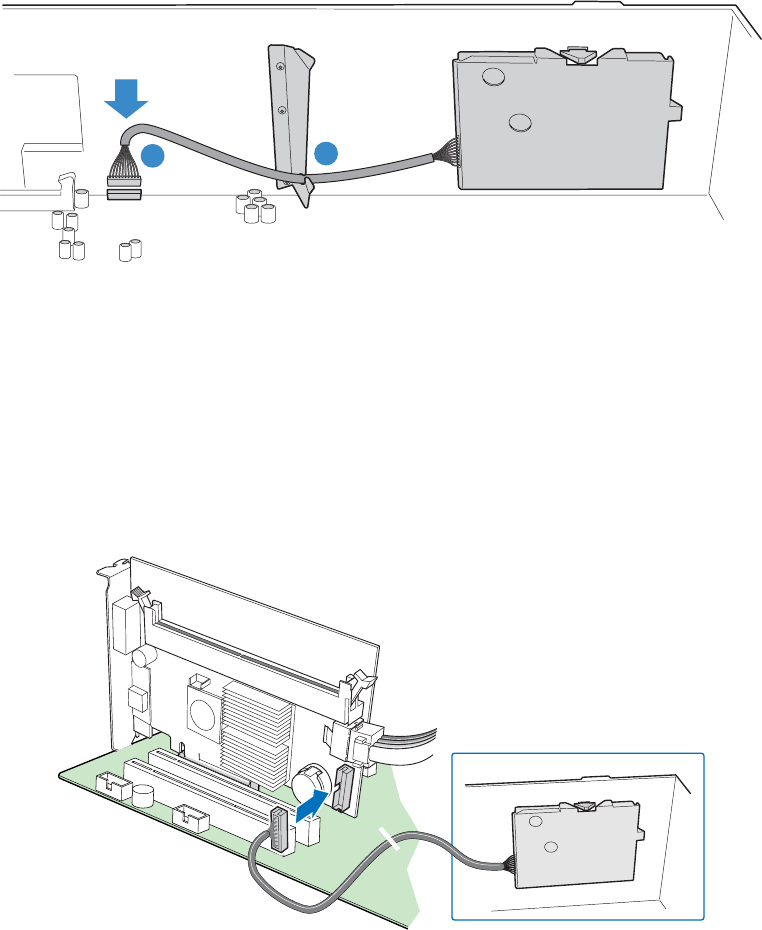
1. Route the cable through the cable holder as shown by Letter “A” of Figure 5.
2. Connect the cable to the main board, as shown below.
TP01409
A
B
Figure 5. Routing and Connecting the Cable inside the Chassis
Intel
®
Server Chassis SC5400, Intel
®
Entry Server Chassis SC5299-E, Intel
®
Server
Platforms SR4850HW4/M and SR6850HW4/M
Connect the cable to the SAS ROMB board as shown below.
Note: RAM is required in the DIMM socket.
AF000254
Figure 6. Routing and Connecting the Cable inside the Chassis
Page view 11
1 2 ... 7 8 9 10 11 12 13

Comments to this Manuals

No comments